
A weather widget for your Windows desktop
Spacedash's Weather widget shows the current weather on your Windows desktop, with the next hours and up to eight days of forecast. It's free and needs no account or API key.
It uses your Windows location, or a city you search for, and keeps the last forecast on screen when you're offline.
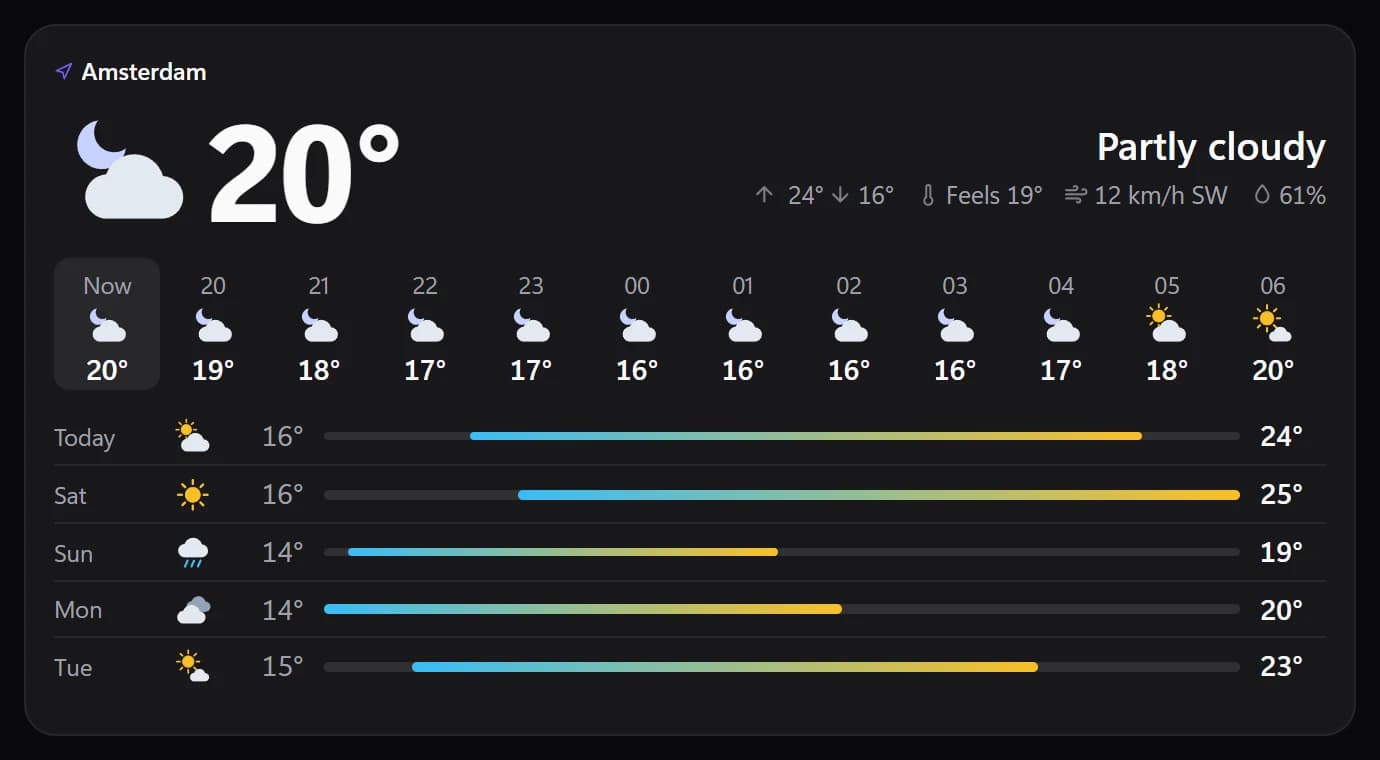
Shown at its default size, with sample data.
What it shows
Now
The temperature and a weather icon, with optional chips for the high and low, feels like, wind, humidity and rain now.
Hours and days
A forecast of up to 12 hours and 2 to 8 days. Choose hours, days, both or none.
Six layouts
Minimal (icon and temperature), One line, Compact, Stacked with the forecast underneath, Wide with it beside, or Auto, which picks by the tile's size.
A sky background
The tile can keep its own background, take a sky that follows the weather, or a soft sky tint.
Where the forecast comes from
Forecasts come from MET Norway, the Norwegian Meteorological Institute, which publishes a free worldwide forecast. Spacedash asks it directly; there is no weather account to create and no key to paste.
Location is Automatic, which uses Windows' location service, or a city you search for by name. The city search uses OpenStreetMap and only runs when you press Search.
The widget checks for a new forecast every five minutes, and Spacedash downloads one when MET Norway says the last one has expired, and at least every two hours.
Setups that use it
Morning glance
Weather in the Wide layout beside the clock and today's calendar, so one look covers the day.
A corner of the monitor
A small Minimal tile with just the icon and temperature, next to the tasks you're working through.
Weather as the picture
Weather Glance shows the same forecast as a designed card: a big number, a picture or the next four days.
What you can set
- Location
- Automatic uses Windows location. Or pick a city: Spacedash looks it up on OpenStreetMap when you press Search.
- Layout
- Auto (follows the tile's size) · Minimal: icon and temperature · One line · Compact: centred · Stacked: forecast underneath · Wide: forecast beside
- Auto picks one from the tile's size. The others keep their arrangement at any size.
- Background
- The tile's own · Sky: follows the weather · Soft sky tint
- Sky paints the tile like the sky outside: blue on a sunny day, grey when it rains, dark at night.
- Icons
- Colour · One colour · Accent
- Alignment
- Auto · Left · Centre · Right
- When it was updated
- When it is old · Always · Never
- Forecast
- Auto · Hours · Days · Both · None
- What a larger tile adds to the weather now. Auto shows the next hours, and the next days too when there is room.
- Hours, at most
- A narrow tile shows fewer.
- One every
- Hour · 2 hours · 3 hours
- Days as
- Auto · A list with ranges · A row of tiles
- Show rain amounts
- How much rain or snow is expected, under each hour and day that has some.
- Temperature
- Auto · °C · °F
- Auto follows the region set in Windows.
- Wind speed
- Auto · km/h · m/s · mph · knots
- Write °C / °F
- 21°C instead of 21°.
- One decimal
- The temperature now as 21.4° instead of 21°.
- Icon colour
- Unset, the icons take the text colour.
- Days, at most
- Colour the temperature by how warm it is
- Temperature colour
- Range bar: cold end
- Range bar: warm end
Parts you can restyle
Resize, recolour, change the font of, or hide each part under Customize → Layout.
- Place
- Icon
- Temperature
- Conditions
- Details
- Next hours
- Next days
Good to know
- Temperature units are Auto, °C or °F; Auto follows your Windows region. Wind is in km/h, m/s, mph or knots.
- Automatic location needs Windows location turned on. If it's off, the tile says so, and you can search for a city instead.
- Offline, the tile keeps showing the last saved forecast with its age.
- The chance of rain is available for the Nordic area only, because that is where MET Norway publishes it.
- Hours and days appear in the Stacked and Wide layouts; small tiles show the current weather only.
Questions
Is the Spacedash Weather widget free?
Yes. Weather is part of Spacedash Free. It needs no account, no subscription and no API key.
Where does the weather data come from?
From MET Norway, the Norwegian Meteorological Institute, which provides a free forecast for the whole world.
Can I set my own city?
Yes. Leave Location on Automatic to use Windows' location, or search for a city by name and pick it from the results.
Can I use Fahrenheit?
Yes. Set the temperature to °F, °C or Auto, which follows your Windows region.
Does it work without internet?
It needs internet to fetch a forecast. Without a connection it shows the last forecast it saved, and how old it is.